

Law firms typically measure productivity using billable hours, with annual targets often ranging from 1,700 to 2,300 hours. Lawyers are expected to meet and ideally surpass these targets. This shows how important time is, as it is the lifeblood of a legal practice. To remain profitable, time must be tracked accurately, often down to the minute.
The problem is that logging every minute of every task in real time is easier said than done. One tool that helps simplify this process is a billing increment chart. It gives lawyers a simple reference to convert time worked into standardized billable units, keeping entries consistent and invoices clean.
This guide explains how billing increments work and includes a billable hours chart to help convert time into billable units. We’ve also created a billable hours calculator for attorneys to simplify time tracking and reduce the need for manual calculations.
What Is a Billing Increment Chart?
A billing increment chart is a reference tool used by attorneys to convert actual time spent on a task into billable units based on a firm’s chosen minimum billing increment. It helps standardize time calculations and keeps time entries consistent when billing clients.
Without it, attorneys may record time differently across matters, creating inconsistencies in the billing process that are difficult to audit and even harder to explain to clients.
How Billing Increment Chart Works in Legal Billing?
Legal work is typically tracked in increments rather than exact minutes. Each hour is divided into equal units, and time is rounded up to the nearest increment. A billing increment chart provides attorneys a reference for every time entry they log.
Here are the most common increment systems used in legal billing:
The most commonly used system is the 6-minute (0.1 hour) increment, which divides an hour into 10 equal units.
Calculate Your Billable Hours
Time directly impacts how much you earn. Calculating billable hours comes down to three things: how long you worked, your firm’s billing increment system, and your hourly rate. Enter your details below, and the billable hours calculator will handle the rest.
How to use this calculator:
- Enter the total time worked on a task or project
- Enter your hourly rate
- Select your current billing increment system
6-Minute Billing Increment Chart
A 6-minute increment, also known as one-tenth of an hour, means each recorded task is billed in 0.1-hour increments. To find your billable amount, locate the range that matches your time worked and multiply that increment by your hourly rate.
For example, if your rate is $200 per hour and you worked for 30 minutes, the time increment is 0.5. That would be $200 × 0.5 = $100 billed.
Billable Hours Chart Sample
Below is a sample billable hours chart for attorneys in 6-minute increments that you can use.
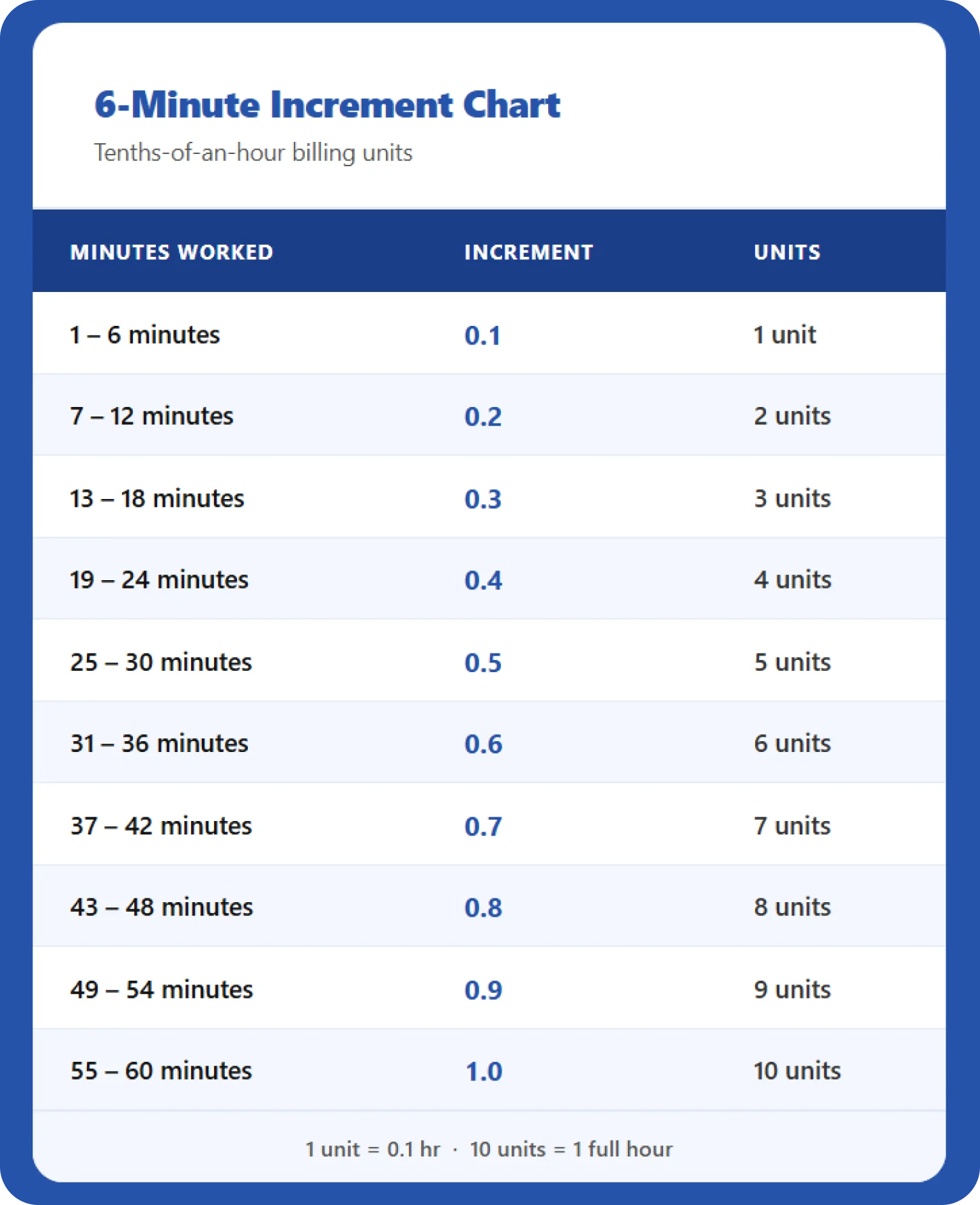
Download it for free and use it as a reference for your time entries.
Why Lawyers Use 6-Minute Increments
The 6-minute system isn’t based on a random choice. It’s built around how hours divide evenly into decimal units. Here’s why it has become the default across the legal industry.
Simple Decimal Conversion
Sixty minutes divided by 10 equals exactly 6 minutes, making each block worth 0.1 hour. This makes it easy to calculate billable amounts using basic multiplication and creates a structure that is intuitive for lawyers and simple to convert into billing amounts.
Standard Practice in Legal Billing
The tenths-of-an-hour model has become a widely accepted industry standard. Many legal billing and accounting platforms are built around this structure. Using the same system makes it easier to maintain consistency across attorneys, departments, and clients.
Fair Compensation for Short Tasks
Lawyers regularly handle small but necessary tasks throughout the day. Without an increment system, those minutes often go unrecorded. The 6-minute increment helps capture and bill that time instead of writing it off.
Faster Time Tracking
Tracking every minute of work can slow attorneys down and make timekeeping more complicated than it needs to be. Billing in 6-minute blocks lets you record time quickly and get back to the work that matters.
Compatibility with Legal Software
Most legal tools, such as Clio, MyCase, and TimeSolv, automatically convert minutes into 0.1-hour increments. Because the 6-minute system aligns with how these tools operate, it remains a practical billing method for most law firms.
How to Choose the Right Billing Increment Structure
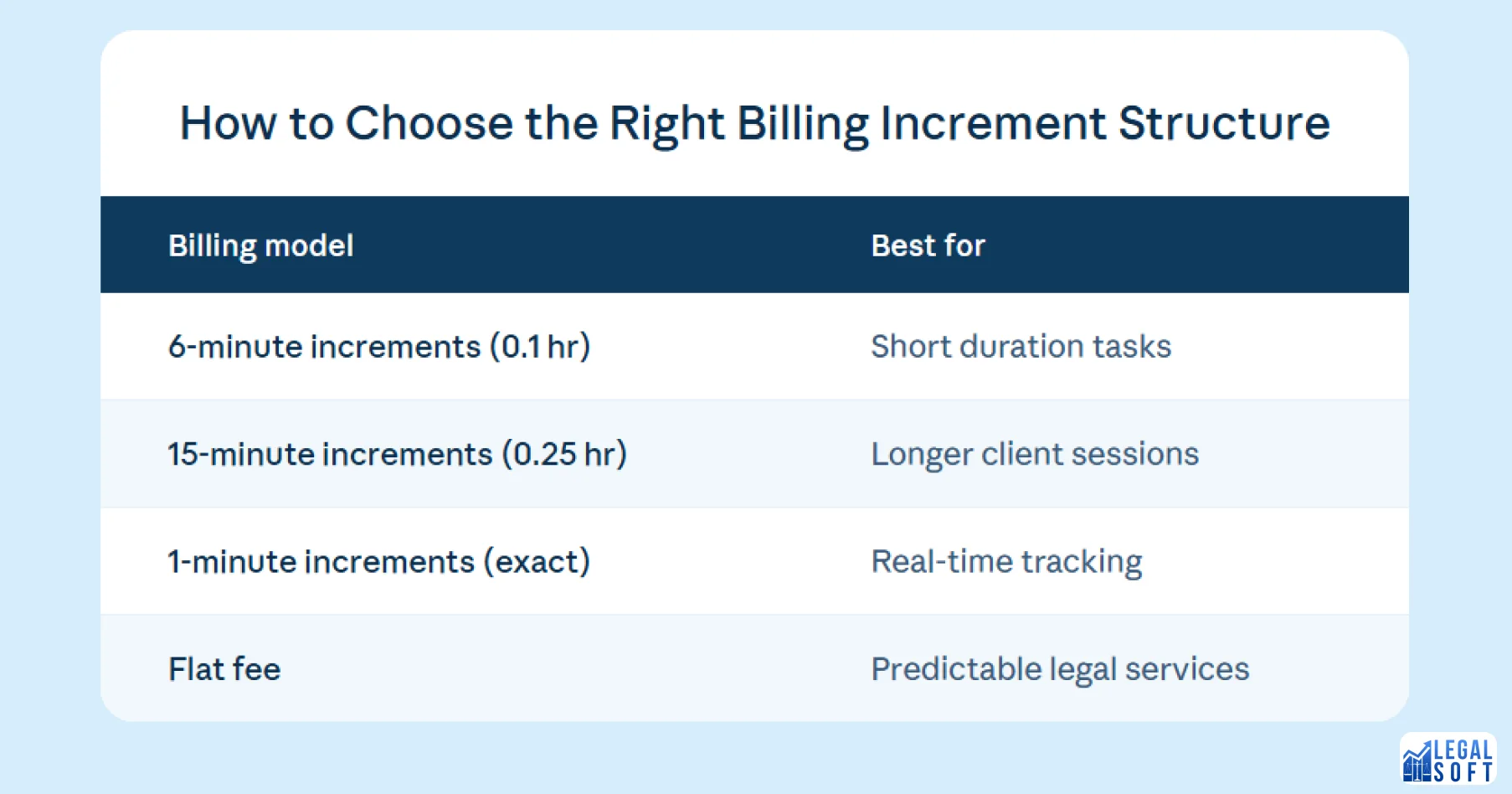
While the 6-minute, or one-tenth-of-an-hour system, is the most common, not every firm uses the same approach. The right structure depends on your firm’s size, practice area, and client expectations. Understanding these options can help attorneys and firm leaders choose the best fit for their workflow and billing strategy.
6-Minute Increments (0.1 Hour)
This is the industry standard and the method most firms use. If your firm handles high-volume, short-duration tasks like emails, calls, and quick document reviews, 6-minute increments make it easier to capture and bill that time.
15-Minute Increments (0.25 Hour)
Some firms bill in quarter-hour blocks, meaning time is rounded to the nearest 15 minutes. For example, 7 minutes of work would be rounded up to 15 minutes. If most of your work involves longer client sessions with minimal task-switching, this approach can simplify tracking without affecting revenue.
1-Minute Increments
Modern legal software allows exact-minute billing, giving clients full transparency into how their time is spent. It’s the most accurate approach, but it requires consistent, real-time tracking and can feel tedious without automation.
Flat Fee Billing
Some legal services avoid hourly billing altogether and charge a fixed price. This works well for predictable, routine matters where the scope is clearly defined, such as wills, contract reviews, and property transfers.
Best Practices for Using a Billable Hours Chart
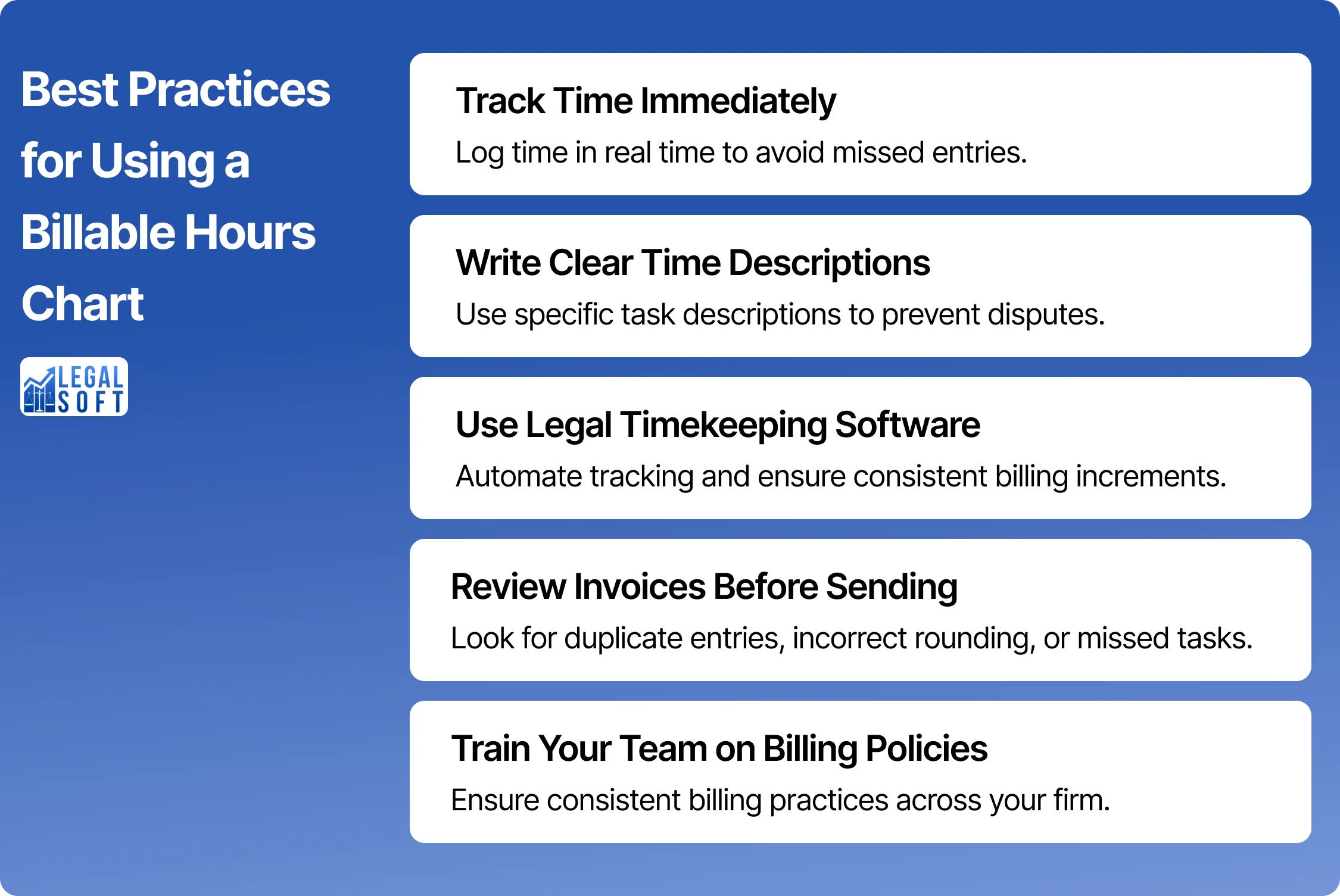
A billing chart is only useful if it’s used consistently. These habits will help you get a more accurate picture of your time and protect your revenue at the end of each month.
Track Time Immediately
The Clio 2024 Legal Trends Report revealed that lawyers bill only about 2.9 hours (36%) for every 8 hours worked, leaving many hours unbilled. Don’t wait until the end of the day or week to log your hours. Record your time or start a timer as soon as you begin a task. Capturing your work in real time helps prevent mistakes and missed entries.
Write Clear Time Descriptions
Break your time entries into individual tasks rather than bundling everything into one block. Specific descriptions like “reviewed draft motion” rather than “case work” make invoices easier for clients to understand and harder to dispute.
Use Legal Timekeeping Software
Modern legal time-tracking tools automatically convert minutes into billable increments as you record them. This removes the manual math, reduces entry errors, and keeps your records consistent across all your matters.
Review Invoices Before Sending
Always review your entries before sending a bill. Look for duplicate entries, rounding errors, and tasks that were accidentally combined or omitted. A quick review helps catch issues before they reach the client.
Train Your Entire Team on Billing Policies
Paralegals and junior attorneys should understand the firm’s billing structure, not just partners. Consistent training ensures every time entry follows the same standard.
How Can Lawyers Track Billable Hours

Lawyers have several options for capturing time throughout the day. The best method depends on how you typically work and where you spend most of your time.
- Legal Practice Management Software: Platforms like Clio, MyCase, and PracticePanther include built-in timers and automatic increment conversion, making them an effective option for most attorneys.
- Mobile Time Tracking. Many lawyers record billable hours from their smartphones, especially when traveling or attending court. Most major legal software platforms offer mobile apps that sync with your desktop records.
- Calendar Integration: Some systems can convert calendar events directly into billable entries, cutting down on manual logging for meetings and scheduled calls.
- Manual Timesheets: Spreadsheets and paper logs are still used in some firms. However, they require more discipline to maintain and are harder to audit at scale.
Whichever method you use, the key is consistency. Switching between systems or tracking methods is where errors often occur. Be mindful to stick with one system to keep your time records accurate.
Conclusion
Billing increments make legal billing consistent and scalable. By converting minutes into standardized units, attorneys can log time quickly, invoice accurately, and give clients a clear picture of the work done on their behalf.
Understanding how billing charts work is one of the most practical ways to protect your time and your bottom line. The more consistently you track your time, the more confident and organized you’ll feel. With the right approach, billing becomes less about math and more about clearly and fairly reflecting the work you do—for both you and your clients.
If you need extra support, Legal Soft provides virtual legal assistants who become a direct part of your team and assist with time tracking, billing, and administrative workflows, so you can focus on your cases.
Frequently Asked Questions
How many billable hours should a lawyer have per month?
Most law firms expect attorneys to bill between 142 and 192 hours per month, which equals roughly 1,700 to 2,300 hours per year. The exact target varies by firm size, practice area, and seniority level.
What does 0.1 mean in attorney billing?
In legal billing, 0.1 represents one-tenth of an hour, which equals 6 minutes of work. It’s the most commonly used billing increment and serves as the base unit in many legal timekeeping systems.
What's the difference between billable and non-billable hours?
Billable hours are time spent directly on client work that can be charged to that client. In contrast, non-billable hours are time that cannot be billed, including internal tasks such as training, marketing, and team meetings.