
Key Takeaways
- A law office filing system is the written set of rules for naming, storing, finding, and retiring client files.
- Most firms already own capable software. What is missing is a written rule and a named owner.
- Pair a numbered matter ID with a fixed subject folder template, then order by date inside each folder.
- Phase the move to digital. Start with new matters, then take the active ones.
A law office filing system is the set of rules your firm uses to name, store, find, and retire client files. It covers folder structure, naming, access rights, and how long you keep things. A good one lets a staff member who did not open the matter find what they need without asking anyone.
Most firms already own software that could do this. What they lack is a written rule and a person who keeps it. That gap is why files still go missing at firms paying for a full document system.
This guide covers the folder shapes that work, the naming rules that last a year, and the staffing that keeps it all from drifting.
What Is a Law Office Filing System?
A law office filing system is a written method for storing and finding legal files. It sets where a file goes, what it gets called, who can open it, and when you destroy it.
Three parts make it work:
- Structure. The folder tree every matter follows.
- Rules. Naming, version, and access rules, written down.
- Upkeep. A named person who files, checks, and closes matters.
Firms build the first part and skip the other two. Then the shape breaks down. Six months later you have four folders named "Discovery," "discovery docs," "DISCOVERY FINAL," and "disc new."
What Are The Five Basic Filing Systems?
The five basic filing systems are alphabetical, numerical, subject, chronological, and geographical. Each sorts files by a different key.
Most firms use two at once. A common pair is numerical at the matter level and subject inside it. Dates then run inside each subfolder, newest on top.
Alphabetical alone breaks down fast. Common last names clash, people change names mid-matter, and the client name ends up in the file path where it should not be.
Paper, Digital, or Hybrid: Which Fits Your Firm?
Many firms use some mix of physical and digital files. Some originals may need to be kept. That can depend on the document, the jurisdiction, court rules, or firm policy.
Check the state, court, and professional rules that apply to you before you destroy any original.
How To Build a Law Office Filing System
1. Inventory what you have
Pull every open matter and note where its files live. Server folders, staff desktops, email, and paper cabinets all count. Most firms find files in at least four places.
2. Pick your matter identifier
Pick one key for every matter and use it everywhere. Year plus a number works well: 2026-0142. It sorts right, stays short, and keeps client names out of file paths.
3. Build one folder template
Make one folder set that every new matter copies. Do not let each lawyer build their own. A set that fits most civil matters:
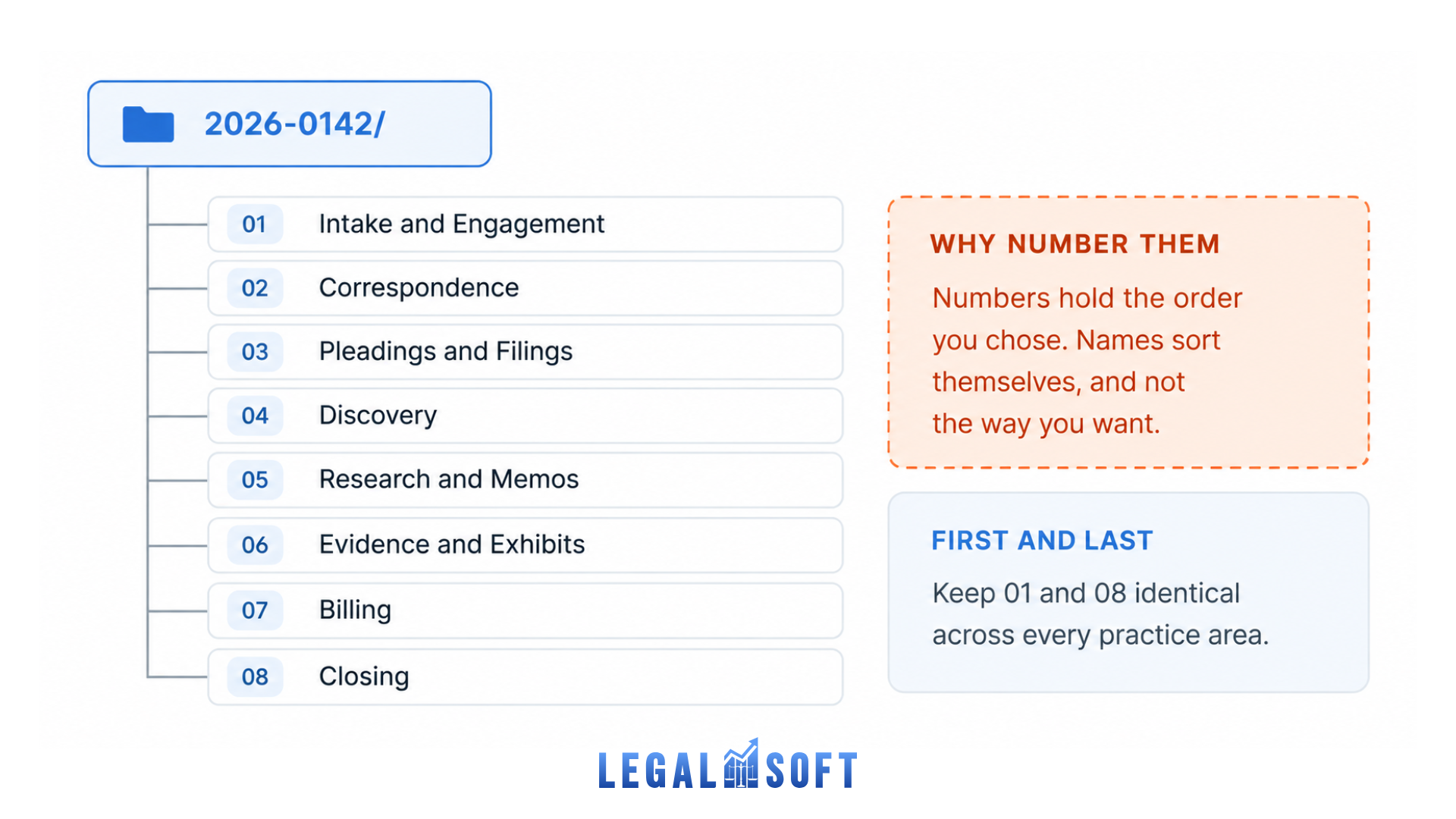
Number the folders. Numbers hold the order you chose. Names do not.
4. Write the naming rule
One rule, one page, no exceptions. Date first, then content, then version.
5. Set permissions before you migrate
Decide who sees what while the folders are still empty. Adding access rights to a live system is much harder.
6. Move files in batches
Start with matters opened this year. Work backward. Closed matters can move last or go straight to storage.
7. Assign an owner
One person runs the system. They file new papers, check folders weekly, and close matters the right way. Without this, every step above breaks down.
Law Office Filing System Examples By Practice Area
The top-level shape stays the same. The middle folders change with the work.
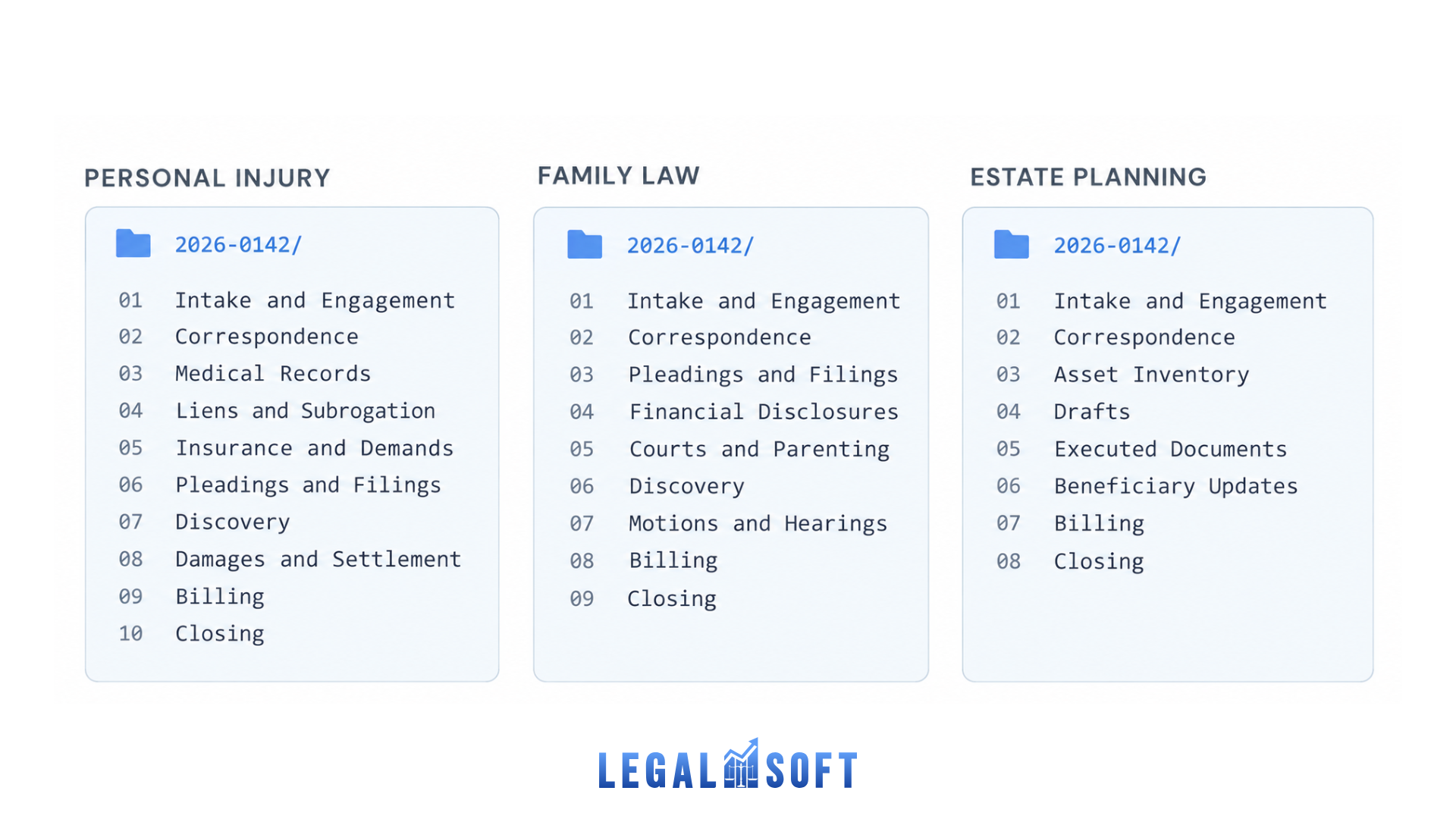
Keep the first and last folders the same across practice areas. Intake and closing work the same way everywhere, so staff who move between teams stay on track.
File Naming Conventions That Survive a Year
A good file name tells you what a file is without opening it. Use this pattern:
Examples:
Four rules make it stick:
- Date first, in YYYY-MM-DD. Files then sort by date on their own.
- No spaces or odd symbols. Use underscores or hyphens. Spaces break links and scripts.
- Version numbers, not words. Use
v01,v02. Neverfinal,FINAL2, orfinal_real. - No private details in names. File names show up in search results, sync logs, and email previews. Social security numbers, health details, and settlement figures do not belong there.
The most common mistake is cramming every detail into the name. Firms end up with names like SmithJ-PI-MVA-Discovery-Interrog-Resp-DRAFT-v3-JK-REVISED.docx. Let the folder path and your software hold that context instead.
Security and access control for legal files
A filing system does more than help staff find documents. It also affects how client information is protected.
Law firms should set controls that suit the information they handle. The right level also depends on the professional, contract, and regulatory rules that apply to the practice.
Common controls may include:
- Role-based access. Limit access to a person's duties and the matters they work on.
- Multi-factor login. Add another layer of cover to accounts that reach client data.
- Encryption. Protect files while stored and while sent, where that fits.
- Access logs. Track who opened or changed a file, where your systems support it.
- Backups. Keep reliable backups. Check now and then that files can be restored.
- Ethical walls. Limit matter access when conflicts or other concerns call for it.
Review the professional-responsibility rules and local requirements that apply to you. Build your security steps around those.
File retention and destruction
There is no single retention period for every law firm or every client file. What applies can turn on the jurisdiction, the document type, and the matter type. It can also turn on professional-responsibility rules, contract duties, and whether the client still has a stake in the material.
Your firm can still set one steady process for closed files. A written policy should cover:
- How closed matters get spotted and archived
- How retention periods are assigned
- Which documents or originals need extra care
- Whether clients must be told first
- Who approves destruction
- How destroyed files are recorded
- How client property is returned or preserved
Your engagement letter and closing process should also say what happens to files after the work ends, where that fits.
Before you destroy any legal file or original, confirm what applies in your jurisdiction and to that material.
Going paperless without disrupting your firm
Scanning every old file at once makes the project harder than it needs to be. A phased approach is easier to manage.
- Start digital with new matters. Set up the new folder structure and filing rules for matters opened from now on.
- Set up your scanning workflow. Where you can, use gear and software that make searchable files, not image-only scans.
- Take active matters first. Move the files your team uses now. Old archives can wait.
- Scan older files when needed. If an old matter wakes up, or someone asks for a document, scan it then.
- Write a rule for paper originals. Say which documents must stay on paper, where they live, and how you track them.
A phased move causes less disruption. The firm can fix how it works now, without first converting every document it has ever held.
What software solves, and what it does not
Legal software falls into three tiers.
General cloud storage can be enough for firms with simple file-management needs. Its legal-specific features vary by platform. Matter-based filing, advanced tagging, email filing, document profiling, and version control may all be thinner than in a dedicated legal system.
Practice management platforms pair file storage with other matter work: calendaring, billing, client contact, and case management. How deep the document features go varies from product to product.
A dedicated document management system is built around heavy document work. Depending on the platform, it may offer deep search, version control, permissions, email filing, file metadata, and more.
Firms weighing legal document automation software should fix the filing structure first. Automation is easier to run when files already follow steady naming, storage, and workflow rules.
A firm still needs a steady structure, a naming rule, a filing process, and one person who keeps it all running.
How to tell if your filing system is working
A filing system should make files easier to find and cut down on stray storage. A few simple in-house measures will tell you whether yours is working.
- Search time. How long does it take someone new to the matter to find a given file?
- Misfile rate. In a file audit, how many documents sit in the wrong place?
- Unfiled backlog. How many files sit in inboxes, downloads, or scratch folders instead of a matter?
- Clean closings. Do closed matters get archived the way your closing and retention steps say?
Your firm can set its own targets based on its caseload and workflow.
Here is a simple test. Pick several matters. Ask a staff member who did not build the folders to find specific files. If only the builder can move through it quickly, the structure or the training needs work.
Who actually maintains the system
This is the part most guides skip. A filing system is a daily job, not a one-off project.
Someone has to save new email to the right matter, name files right, catch the misfiles, and close matters on time. At most firms that work falls to whoever is least busy that day, which means it falls to no one.
A filing system is easier to keep up when the duty is clearly assigned, not treated as shared admin work. It works like the rest of your law firm organizational structure: one clear owner beats a shared duty.
That duty often sits with a legal assistant, paralegal, or other legal support staffer. They handle file intake, filing, case organization, and matter closing.
If a full-time hire is hard to justify, a virtual legal assistant can carry that work. Legal Soft places pre-vetted staff trained for law firm work. They sign an NDA and train on your current case management system. They work for your firm only, not split across clients.
Frequently asked questions
What is a law office filing system?
It is the written method a firm uses to store, name, guard, and retire client files. It covers folder structure, file naming, access rights, and how long you keep things.
What is a good filing system for a law office?
A matter number at the top level, a fixed set of subject folders inside each matter, and date order within folders. Add one written naming rule and one named owner.
What are the five basic filing systems?
Alphabetical, numerical, subject, chronological, and geographical. Law firms most often combine numerical matter numbers with subject-based subfolders.
How long must a law firm keep client files?
There is no single period for every firm or every file. What applies can turn on the jurisdiction, the document type, and the matter type. It can also turn on professional-responsibility rules, contract duties, and whether the client still has a stake. Confirm what applies to you and write it into a retention policy.
What is the best software for a law office?
It depends on how heavy your document work is. Firms with simple needs may get by on general cloud storage. Firms that want files next to calendaring and billing tend to look at practice management platforms. Firms with heavy document work tend to look at a dedicated document management system.
Should a small law firm go paperless?
A phased approach beats scanning every old file at once. Start with new matters. Then take the active ones. Then set a rule for the paper originals you must keep.
Who should manage a law firm's filing system?
The duty is easier to keep up when one named person holds it. It often sits with a legal assistant, paralegal, or other legal support staffer.